CNC Shop Documentation Software — Built by machinists, for machinists — powered by AI

OnSet Shop Control
The Comprehensive Machining Knowledge System — Powered by AI
Setup Sheet · Work Instructions · Tool Library · SOP Module · Machining Glossary · Repository
OnSet Setup Sheet and Work Instructions was developed with the time-tested, proven techniques of documenting CNC machining operations. As we move deeper into the industrial revolution that is CNC machining, OnSet is taking full advantage with the advent of AI to elevate that foundation to a level unknown before. Our v3 rollout transforms the system into what will be the industry’s first CNC machining knowledge-based system that will sustain and grow, for the years to come.
Runs on your local network — one-time purchase — no subscriptions — no cloud
15+
sub-pages
per Setup Sheet record
4
applications
modules — complete system
$999
Complete Bundle
introductory offer
v3.1
latest release
free v3 updates for 1 year
🖨️ Setup Sheet
⚙️ Work Instructions
🔩 Tool Library
📋 SOP Module
🌐 Machining Glossary
🔒 Repository
🔧 Built by machinists, for machinists — powered by AI 🤖
How OnSet Compares
Most shops document setups in shared drives, CAM notes, or overpriced ERP modules. None of it was built for the shop floor — and none of it has AI.
Features
Built by machinists, for machinists — powered by AI
🖨️ Setup Sheet
⚙️ Work Instructions
🔩 Tool Library
📋 SOP Module
🌐 Machining Glossary
🔒 Repository
🔧 Built by machinists, for machinists — powered by AI 🤖
OnSet Shop Control is not documentation software. It is a comprehensive machining knowledge system — the first of its kind — that captures, organizes, and transfers the accumulated knowledge of CNC machining in a single platform. The Setup Sheet, Work Instructions, Tool Library, SOP Module, and Machining Glossary are the delivery mechanisms. The product is the knowledge itself — nearly 75 years of CNC history, from MIT 1952 to the AI-assisted shop floor of today, distilled into a system built for the people who actually make things. Every term in the Glossary, every SOP in the library, every setup sheet on the floor represents knowledge that previously lived only in the heads of experienced machinists — and disappeared when they retired. OnSet changes that. Built by machinists, for machinists — powered by AI.
Setup Sheet
15+ Sub-Pages Per Record
📋 Setup Sheet
- Auto-numbered 5-digit record ID
- Customer, Part#, Rev, Machine, Program, Operation, Process
- Part photo in every print header
- 1–4 turret sections — custom labels
- Per-tool Notes column
- Tool ID tab-out auto-fill from Tool Library
- Always-on Programmer Footer
🔧 Tool Crib Build Sheet
- Auto-assembled from all turret sections
- OOH, holder, extension, perishable P/N fields
- Tool ID links to Tool Library
- Section headers with dark separator rows
- Editable crib fields independent of Setup Sheet
📝 Work Instructions
- Setup, Operation, Inspection instruction tabs
- Photo per instruction type
- Character count display
📋 Instruction Text Pages
- Dedicated Setup, Operation, Inspection pages
- Server-side paginated print — overflow = continuation pages
- Character-aware line wrapping
- Same output from own page or Print All
📸 Picture Pages
- Full-page Setup, Operation, Inspection picture pages
- Setup Sketch page for drawings
- Photos compressed and persisted in localStorage
- Survive browser restarts and Chrome closure
✨ User-Created Pages
- Additional Info: photo + notes per page
- Additional Instructions: unlimited text pages
- Name each page anything you want
- Auto-paginate on overflow in print
- Appear in print page selection
Tool Library
11 Component Sub-Libraries
🔩 Component Libraries
- Holders, Extensions, Cutter Bodies
- Inserts, Endmills, Drills, Taps
- Mill Cutters, Boring Heads, Slides, Cartridges
- Each with ID, Description, P/N, Manufacturer
🛠 Tool Assembly Records
- Tool photo (server-stored)
- All sub-components linked from libraries
- OOH, Gage Length, Diameter, Shank
- Auto-fill into Setup Sheet Tool List
🖨 Tool Assembly Print
- Professional landscape print sheet
- Tool photo + specifications panel
- Full sub-component table with P/Ns
- OnSet banner with Tool ID
System
Built for the Shop Floor
⚡ Navigation
- Mousewheel — one tick navigates sub-pages (when over the document)
- Esc key returns to Setup Sheet from any sub-page
- Enter key advances to next cell in grids
- Arrow keys navigate component lists
🖨 Print System
- Server-rendered output — not a browser screenshot
- Page selection modal — print exactly what you need
- Continuation pages for overflow text
- Your logo on every page
- Runs on your own server — no external dependency
💾 Data & Storage
- SQLite database — single file backup
- Photos compressed and persisted in browser localStorage
- Tool photos stored on server filesystem
- Runs on your local network — completely offline
🏢 Your Company Branding
- Replace OnSet logo with your own company logo
- Your logo appears on every page — screen and print
- Every printed document carries your company identity
- Professional look for customers and shop floor alike
- Simple logo swap — no coding required
Screenshots
See OnSet Shop Control in action
🖨️ Setup Sheet
⚙️ Work Instructions
🔩 Tool Library
📋 SOP Module
🌐 Machining Glossary
🔒 Repository
🔧 Built by machinists, for machinists — powered by AI 🤖
🔍
Tip: Click any screenshot to enlarge it.
Use the ← → arrows or your keyboard arrow keys to page through all screenshots.
Press Esc to close.
🖥Setup Sheet & Tool Library
Side by Side
Screenshot 01
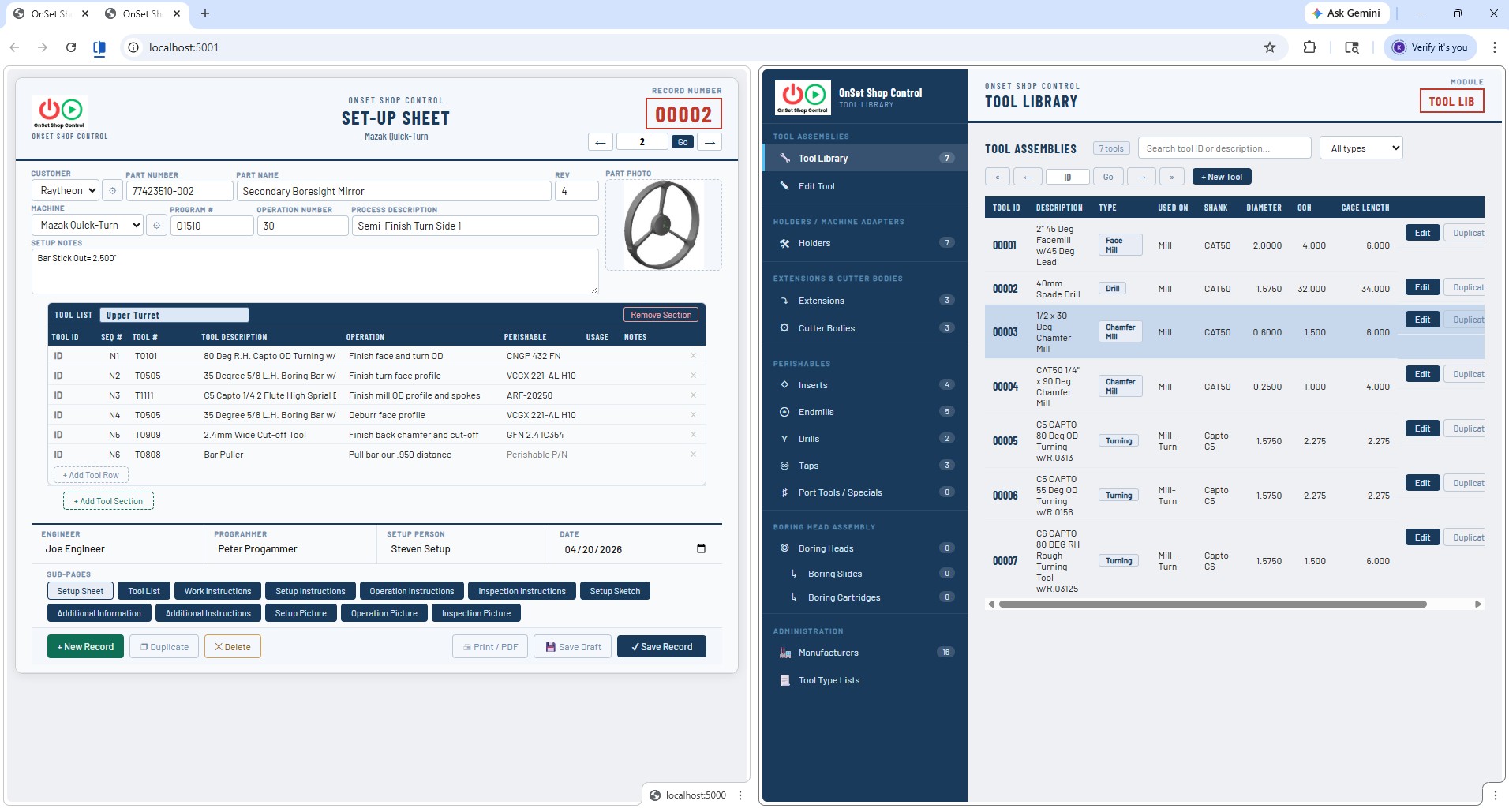
Setup Sheet & Tool Library — Side by Side
When launched, the Setup Sheet opens on port 5000 and the Tool Library opens on port 5001
in separate browser tabs automatically. Choose Chrome's split screen option and both apps
run side by side in a single browser window for increased productivity —
enter a Tool ID on the Setup Sheet and the Tool Library is right there to reference or update.
Both apps share the same local network with no internet required.
Setup Sheet
Tool Library
Split Screen
Local Network
Screenshot 02
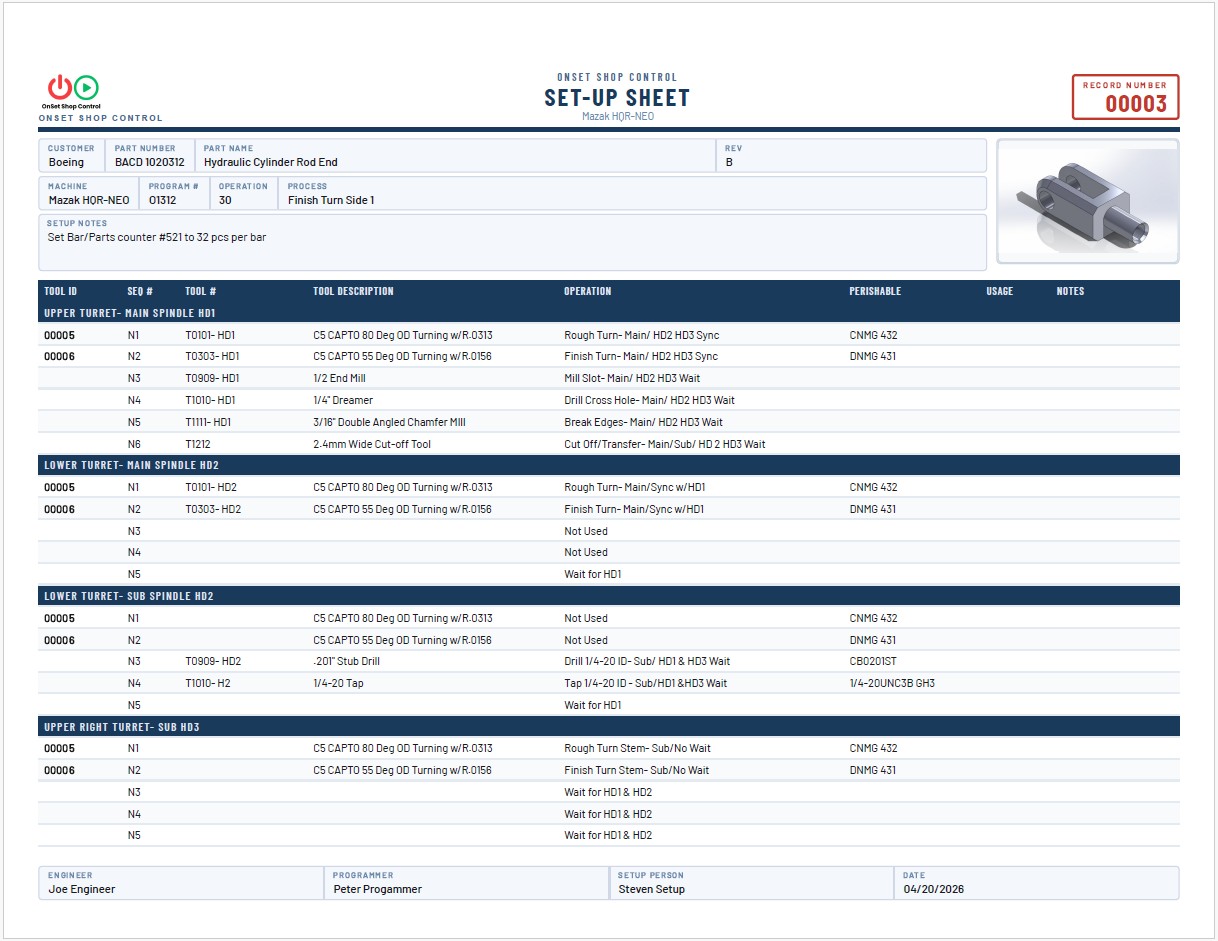
Main Setup Sheet
Full Setup Sheet record showing multi-turret layout with custom section labels,
part photo in the header, per-tool Notes column, and the always-on Programmer Footer.
Auto-numbered 5-digit record ID, Customer, Part#, Revision, Machine, Program, Operation, and Process fields.
Tool ID tab-out triggers auto-fill from the Tool Library — or just type it in if the library isn't used.
Multi-Turret
Tool Grid
Programmer Footer
Part Photo
🖨Print Modal &
Multi-Turret Print
Screenshot 03
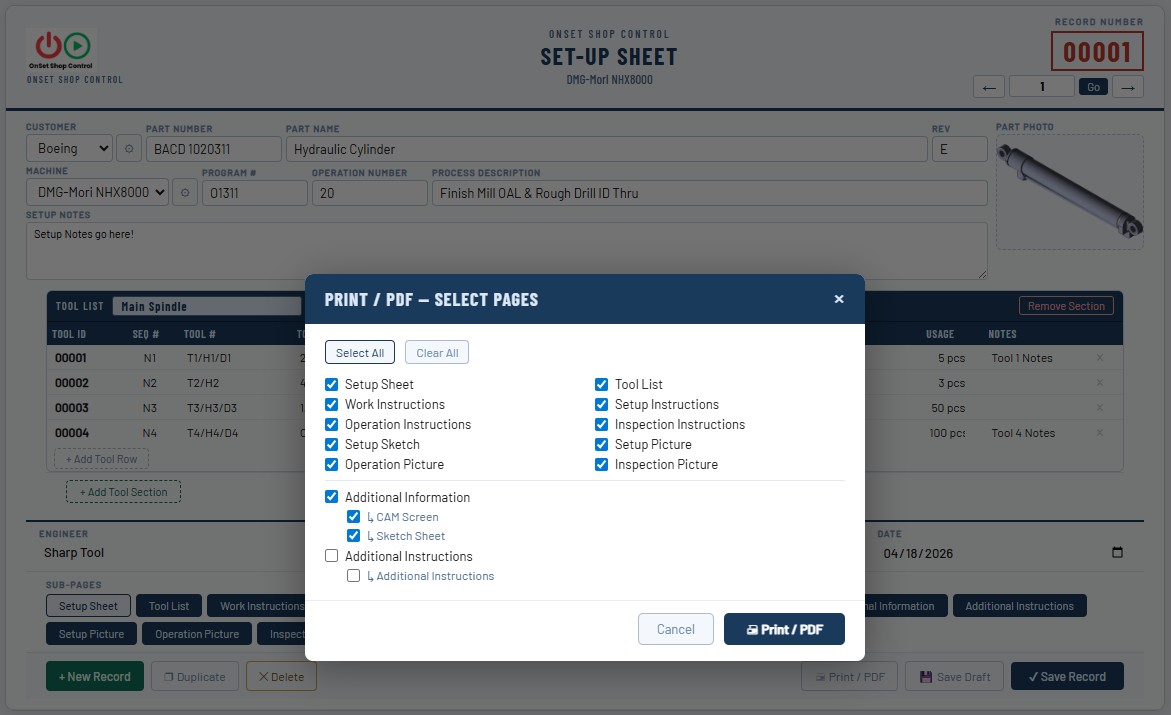
Print / Save PDF Modal & Multi-Turret Setup Sheet Print
The Print page selection modal lets you choose exactly which sub-pages to include in your PDF output.
Select the full package or just the pages you need for a specific operator.
The resulting multi-turret print shows all tool sections with a clean professional layout,
OnSet banner, part photo, and Programmer Footer on every page.
Print Modal
Page Selection
PDF Output
Multi-Turret Print
Screenshot 04
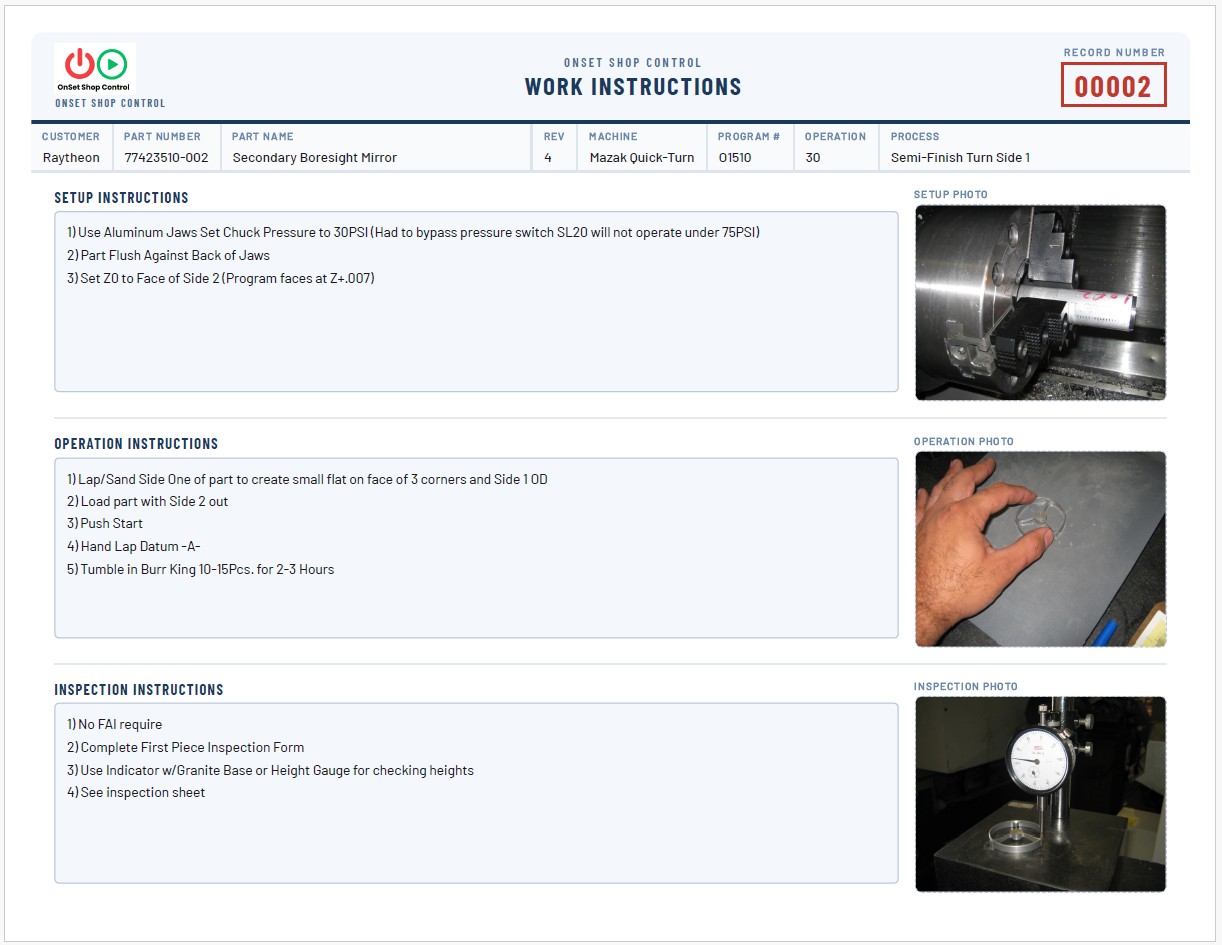
Work Instructions
The Work Instruction page is a single-page snapshot combining Setup, Operation, and Inspection
— a quick reference view alongside the more inclusive dedicated instruction pages.
Each dedicated instruction page (Setup, Operation, and Inspection) has its own full text entry
and full-page photo support.
Text pages use server-side pagination — overflow text automatically creates properly formatted
continuation pages when printing, identical output whether printing from the individual page
or from the Setup Sheet Print All menu.
Setup Instructions
Operation Instructions
Inspection
Auto-Pagination
Screenshot 05
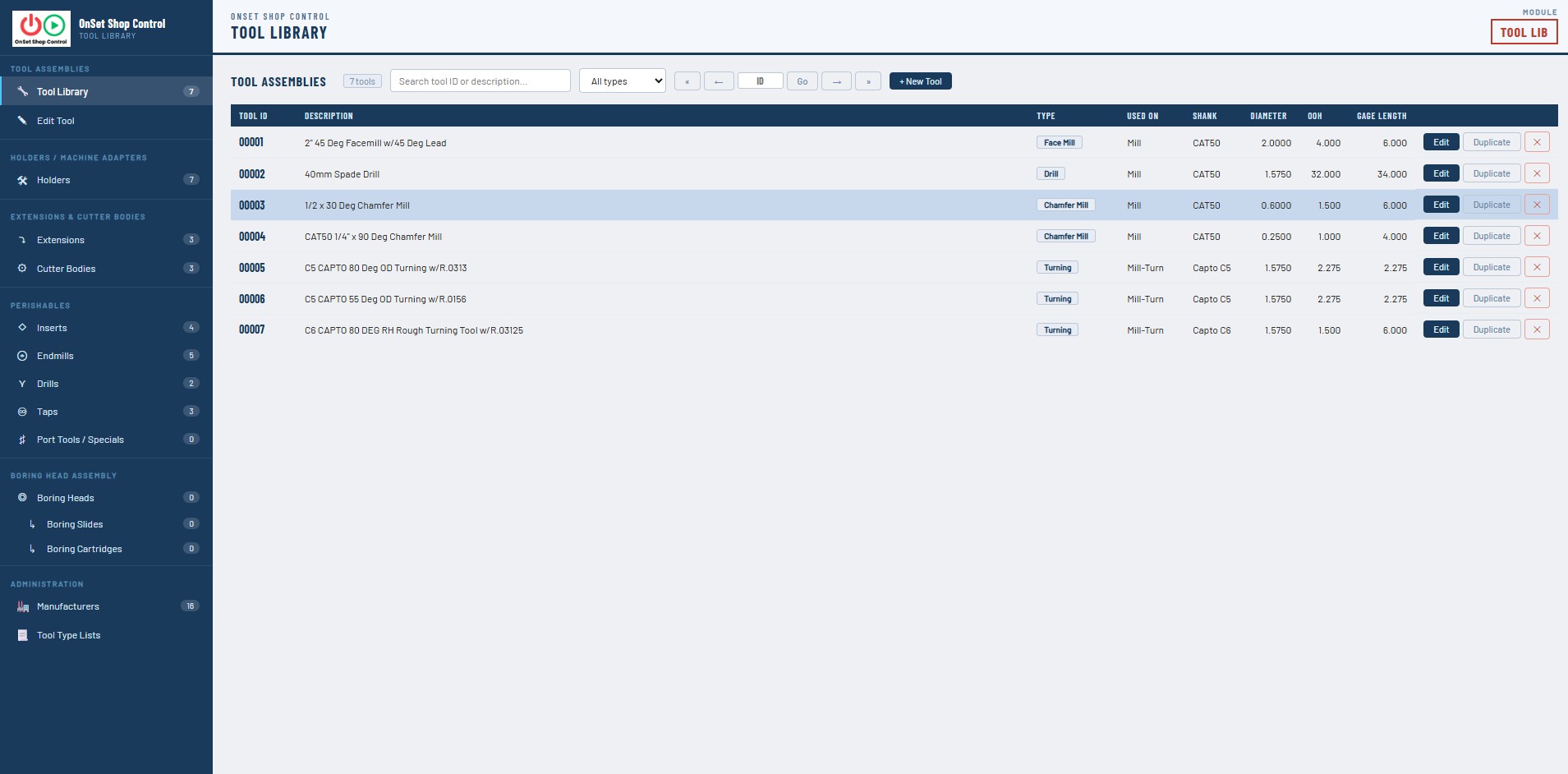
Tool Library & Tool Assembly
The Tool Library manages 11 component sub-libraries — Holders, Extensions, Cutter Bodies,
Inserts, Endmills, Drills, Taps, Mill Cutters, Boring Heads, Boring Slides, and Boring Cartridges.
Tool Assembly records link all components together with a tool photo and specifications.
Click Print to generate a professional landscape Tool Assembly sheet showing
the photo, specs panel, and complete sub-component table with part numbers.
Tool Library
Tool Assembly
11 Libraries
Assembly Print Sheet
Screenshot 06
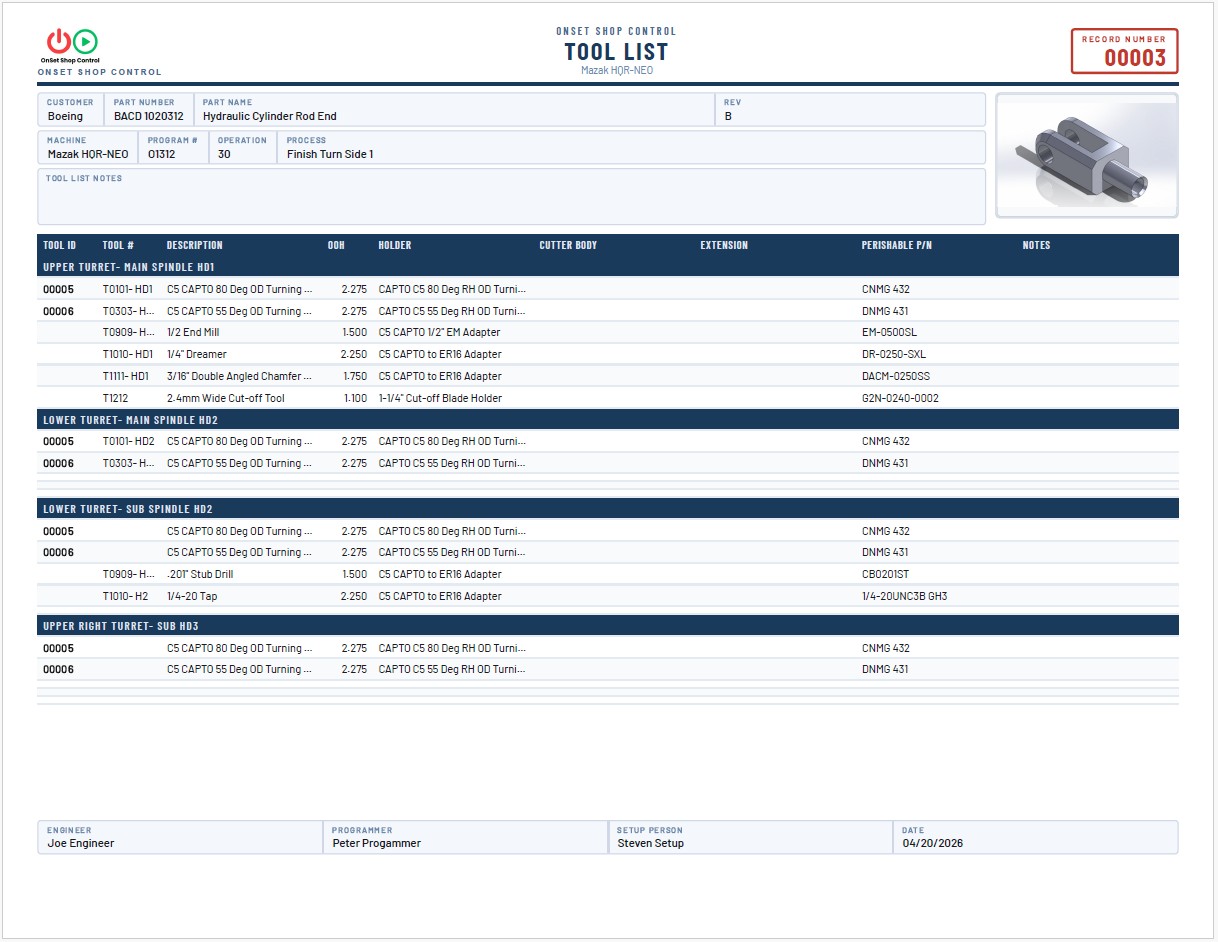
Tool Crib Build Sheet — Automatically Assembled
The Tool Crib Build Sheet is generated automatically from all turret sections on the Setup Sheet.
Every tool entered on the Setup Sheet appears here with its tool ID, tool number, description,
holder, extension, perishable part number, OOH, and notes.
When a Tool ID is entered on the Setup Sheet and the Tool Library is installed, the tab-out function
auto-fills the holder, extension, perishable P/N, and OOH directly from the Tool Library —
or just type the information in if the library isn't used.
Section headers with dark navy separator rows keep multi-turret layouts organized and easy to read.
The complete crib tool list prints as a standalone page or part of the complete document package.
Tool Crib Build Sheet
Auto-Assembled
Multi-Turret
Auto-Fill from Library
Pricing
Simple. One-time. Yours forever.
🎉 Introductory Pricing — Limited Time
🖨️ Setup Sheet
⚙️ Work Instructions
🔩 Tool Library
📋 SOP Module
🌐 Machining Glossary
🔒 Repository
🔧 Built by machinists, for machinists — powered by AI 🤖
Get OnSet Shop Control
Instant delivery after purchase. Start running in under 10 minutes.
1
Purchase
Secure checkout via Paddle. Credit card, PayPal, or bank transfer. VAT handled automatically.
paddle.com
2
Delivery
Paddle sends your receipt with a secure download link. File served via Cloudflare — fast and always available.
Instant email delivery
3
Install & Run
Unzip the folder. Double-click the launcher. Browser opens automatically. Under 10 minutes from purchase to running.
Python 3.9+ required (free)
Software — Purchase to Download
Setup Sheet Edition
All 15+ sub-pages · Unlimited records · Server-side print · Your local network
$349
Tool Library Add-On
11 component libraries · Tool Assembly records with photo · Auto-fill into Setup Sheet
$129
Setup Sheet & Tool Library BUNDLE
Setup Sheet + Tool Library · Both apps, one install · Save $49
$449
Complete Bundle + Support
BEST VALUE
Setup Sheet + Tool Library + 1 Year Support Plan · Save $77 · All updates included
🎉 Introductory Offer — Just $499 for Everything · Limited Time Only
$499
Documentation — View or Download Free
Product Overview
Complete feature list, specifications, and system requirements
Free
Complete Bundle Install Guide
Step-by-step installation for Setup Sheet + Tool Library
Free
Technical Guide
Full system architecture, ports, database, network, print engine & troubleshooting — for IT evaluation
Free
Swapping Your Database Guide
Load the sample database so your crew can explore real documentation examples — then restore OnSet to a clean fresh database when you're ready to go live
Free
Sample Documentation — See What OnSet Produces
Complex 3-Turret Lathe Setup Package
Complete documentation package for a complex 3-turret CNC lathe operation — Setup Sheet, Tool List, all instruction pages, and picture pages
Sample
Simple Setup Sheet — No Tool Library
Straightforward example showing manual data entry without using the Tool Library auto-fill feature — just type it in!
Sample
Comprehensive Documentation Package
Full documentation showing multiple user-created Additional Instruction pages with continuation pages — the complete OnSet workflow
Sample
Terms of Service
Effective April 27, 2026
Please read these Terms of Service carefully before purchasing or using OnSet Shop Control software.
1. Agreement to Terms
By purchasing, downloading, or using OnSet Shop Control software, you agree to be bound by these Terms of Service. If you do not agree to these terms, do not purchase or use the software.
2. License
OnSet Shop Control grants you a non-exclusive, non-transferable, perpetual license to install and use the purchased software on computers owned or controlled by you for your internal business operations.
- You may install the software on multiple computers within a single business location.
- You may not resell, sublicense, rent, lease, or distribute the software to third parties.
- You may not reverse engineer, decompile, or disassemble the software.
- Each purchase is for one business entity. Multi-location businesses require separate licenses per location.
3. Payment & Delivery
All payments are processed securely by Paddle.com, our authorized reseller. Upon successful payment, you will receive a download link via email. Prices are in US Dollars. All purchases are final subject to the Refund Policy below.
4. Support Plan
The optional Support Plan is an annual subscription providing software updates and email support for one year from the date of purchase. The Support Plan does not affect your perpetual software license — your right to use the software continues regardless of whether you maintain an active Support Plan. Support Plan renewals are optional and must be purchased separately upon expiration.
5. Intellectual Property
OnSet Shop Control software, including all code, design, documentation, and related materials, is the intellectual property of OnSet Shop Control and is protected by copyright law. Your purchase grants you a license to use the software — it does not transfer any ownership or intellectual property rights to you.
6. Data & Privacy
OnSet Shop Control runs entirely on your local network. No data, records, photos, or shop information is transmitted to OnSet Shop Control or any third party. Your data stays in your shop. See our Privacy Policy for complete details.
7. Disclaimer of Warranties
The software is provided "as is" without warranty of any kind, express or implied. OnSet Shop Control does not warrant that the software will be error-free or uninterrupted. You assume all risk associated with the quality and performance of the software.
8. Limitation of Liability
In no event shall OnSet Shop Control be liable for any indirect, incidental, special, or consequential damages arising from your use of the software, even if advised of the possibility of such damages. Our total liability shall not exceed the amount you paid for the software.
9. Updates & Modifications
We reserve the right to modify these Terms of Service at any time. Continued use of the software after changes constitutes acceptance of the new terms. We will post the updated terms on our website with a new effective date.
10. Contact
Questions about these Terms? Contact us at info@onsetshopcontrol.com
Privacy Policy
Effective April 27, 2026
This Privacy Policy explains how OnSet Shop Control collects, uses, and protects information when you visit our website or purchase our software.
1. Information We Collect
Website visitors: Our website does not use cookies, tracking pixels, or analytics. We do not collect any personal information from visitors to onsetshopcontrol.com.
Customers (via Paddle): When you purchase software, Paddle.com processes your payment. Paddle collects your name, email address, and payment information as required to complete your transaction. OnSet Shop Control receives your name and email address from Paddle for order fulfillment and support purposes only.
Support emails: When you contact us by email, we retain your name, email address, and the content of your message to provide support and improve our product.
2. The Software Itself — Your Data Stays With You
OnSet Shop Control is a local application that runs entirely on your own computer or local network. The software does not transmit any data to OnSet Shop Control or any third party. Your setup sheet records, part photos, tool library data, and all shop documentation remain exclusively on your hardware. We have no access to your data and never will.
3. How We Use Information
- To deliver your software purchase and license
- To send you your download link and receipt
- To respond to support requests
- To notify you of important software updates (if you have an active Support Plan)
- We do not sell, rent, or share your personal information with any third party for marketing purposes
4. Third-Party Services
Paddle.com is our payment processor and authorized reseller. When you purchase, you are subject to Paddle's Privacy Policy and Terms of Service in addition to ours. Paddle handles all payment card data — we never see your credit card information.
Google Fonts is used on this website to load typography. Google may log your IP address when fonts are loaded. No other third-party services are used on this website.
5. Data Retention
We retain purchase records (name, email, product, date) for a minimum of 7 years as required for tax and accounting purposes. Support correspondence is retained for up to 3 years. You may request deletion of your personal data at any time by emailing us — note that we are required to retain purchase records for legal compliance.
6. Your Rights
You have the right to request access to, correction of, or deletion of your personal data. To exercise these rights, email us at info@onsetshopcontrol.com. For payment data, contact Paddle directly as they are the data controller for payment information.
7. Security
We take reasonable measures to protect the limited personal information we hold. All payment processing is handled by Paddle using industry-standard encryption. Email communications are stored securely.
8. Changes to This Policy
We may update this Privacy Policy from time to time. We will post the updated policy on this page with a new effective date. Continued use of our website or software after changes constitutes acceptance.
9. Contact
Privacy questions? Contact us at info@onsetshopcontrol.com
Refund Policy
Effective April 27, 2026
We want you to be completely satisfied with OnSet Shop Control. This policy explains our approach to refunds.
✅ Our Commitment
We stand behind our software. If OnSet Shop Control does not work as described and we cannot resolve the issue, we will issue a full refund within the refund window below.
1. Software Purchases — 14-Day Refund Window
We offer a 14-day refund on all software purchases (Setup Sheet Edition, Tool Library Add-On, Complete Bundle, Complete Bundle + Support) subject to the following conditions:
- You must contact us within 14 days of your purchase date
- You must describe the issue you experienced
- We will make a reasonable attempt to resolve the issue before processing a refund
- If we cannot resolve the issue to your satisfaction, a full refund will be issued
2. Support Plan — Annual Subscription
The annual Support Plan may be cancelled within 14 days of purchase for a full refund if no support services have been used. After 14 days or after support services have been rendered, the Support Plan fee is non-refundable. Cancellation of the Support Plan does not affect your perpetual software license.
3. How to Request a Refund
To request a refund, email us at info@onsetshopcontrol.com with:
- Your name and email address used for the purchase
- Your Paddle order number (found in your purchase receipt)
- A description of the issue or reason for the refund request
We respond to all refund requests within 2 business days. Approved refunds are processed by Paddle and typically appear on your original payment method within 5–10 business days depending on your bank.
4. Circumstances Outside Our Control
Refunds are not provided for issues caused by: incompatible or unsupported operating systems (Windows versions older than Windows 10, or macOS versions older than 12), failure to meet the stated Python 3.9+ requirement, or network/firewall configurations that prevent the software from running on your specific network. We are happy to assist troubleshoot these situations even if they fall outside our refund policy.
5. Contact
Refund requests and questions: info@onsetshopcontrol.com
We're a small team and we genuinely want every customer to succeed with the software.